.png?width=180&height=40&name=00-primary%20(10).png)
Coupons & Discount Codes
SportNinja allows administrators to create flexible coupon codes to apply discounts to registrations. Coupons can be configured at different levels of your organization hierarchy and tailored with specific rules, dates, and usage limits.
Where Coupons Can Be Created
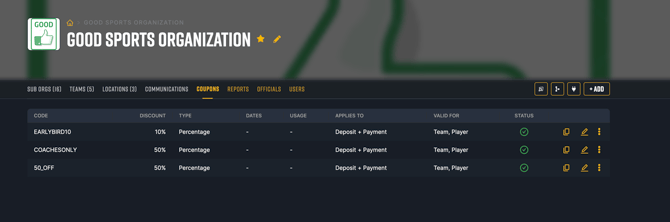
1. Global Level (Root Organization)
Coupons created at the root organization level automatically apply to:
-
All sub-organizations
-
All competitions (seasons, tournaments, camps, etc.)
-
All applicable registration types underneath
This is ideal for:
-
Organization-wide promotions
-
Early-bird campaigns
-
Sponsor-driven discount codes
-
Loyalty or referral offers
2. Competition Level (Season or Tournament Specific)
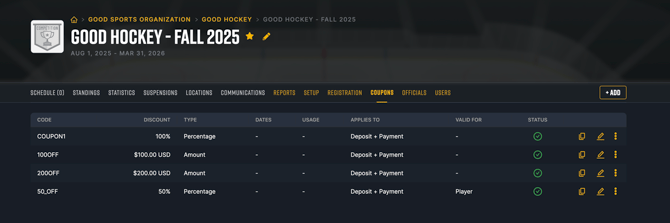
Coupons created at the competition level apply only to that specific:
-
Season
-
Tournament
-
Event
They will not apply to other competitions within the organization.
This is ideal for:
-
Tournament-specific promotions
-
Targeted discounts
-
Private codes for select teams
-
Short-term event campaigns
Coupon Configuration Options
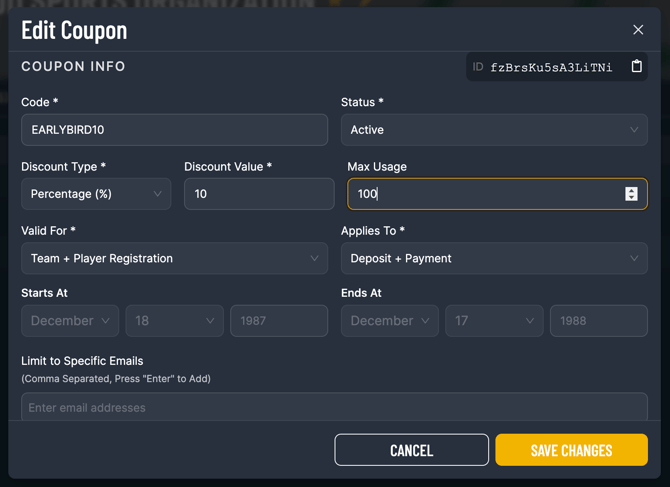
Coupons are highly configurable. When creating a coupon, administrators can define:
-
Discount Type
-
Percentage discount (e.g., 10% off)
-
Fixed amount discount (e.g., $50 off)
-
-
Validity Dates
-
Start date
-
Expiry date
-
-
Usage Limits
-
Maximum total redemptions
-
Per-user redemption limits
-
-
Registration Restrictions
-
Apply to specific registration types
-
Apply to specific age groups or divisions (if applicable)
-
This ensures full control over how and where discounts are applied.
How Coupons Work
Step 1: Share the Code
Once created, simply:
-
Copy the coupon code
-
Share it via email, social feed, website, or sponsor
-
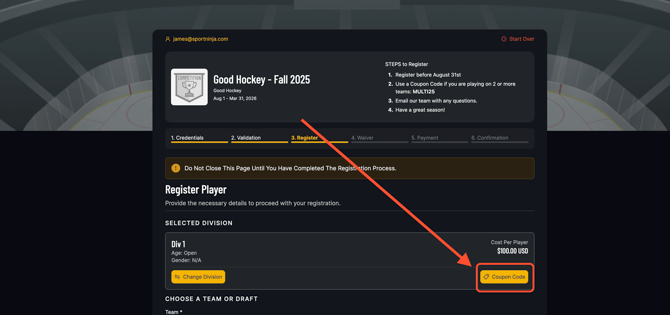
Optionally display it directly on your registration page
Step 2: User Enters Code During Registration
During checkout:
-
The registrant enters the coupon code
-
The system validates the code in real time
-
The discount is applied instantly
-
The updated total is shown before payment is finalized
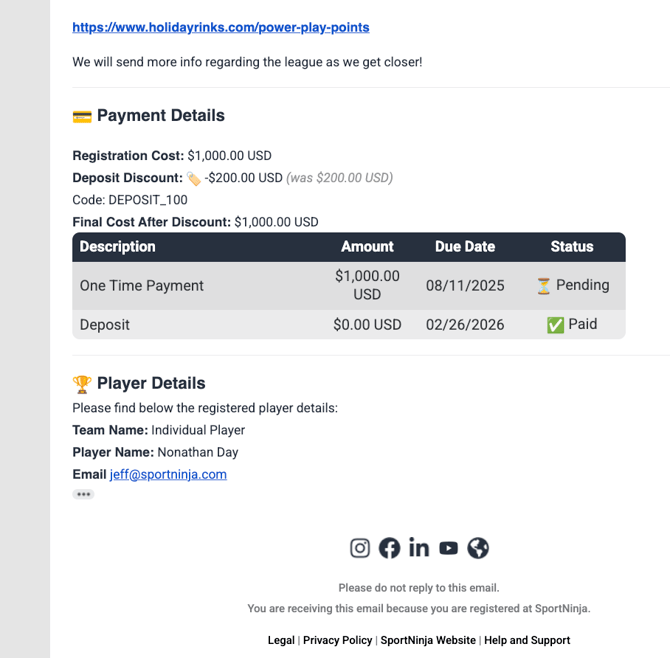
Step 3: Confirmation Email
After successful registration:
-
The applied discount is clearly reflected in the receipt
-
The confirmation email shows:
-
Original amount
-
Discount applied
-
Final total paid
-
Payment confirmation details
-
This provides transparency for both participants and administrators.
Best Practices
-
Use expiration dates to create urgency.
-
Set redemption limits to control exposure.
-
Use competition-level coupons for targeted promotions.
-
Track usage to measure campaign effectiveness.