---
title: "Family Management: Add an Additional Parent or Guardian"
description: Family Management
---
[Skip to content](https://support.sportninja.com/family#main-content)
[Customer Portal (Login)](https://tickets.sportninja.com/?hsLang=en)
[.png?width=180&height=40&name=00-primary%20(10).png)](https://support.sportninja.com/?hsLang=en)
- [Support Center - Articles](https://support.sportninja.com/)
- [Sign-out](https://tickets.sportninja.com/_hcms/mem/logout)
Open main navigation
Close main navigation
- [Support Center - Articles](https://support.sportninja.com/)
- [Sign-out](https://tickets.sportninja.com/_hcms/mem/logout)
- [Customer Portal (Login)](https://tickets.sportninja.com/)
- [Create a new ticket](https://share.hsforms.com/1j_homW9dRNmwFUO9hkDq9wqwtlc)
[Create a new ticket](https://share.hsforms.com/1j_homW9dRNmwFUO9hkDq9wqwtlc)
How can we help?
- There are no suggestions because the search field is empty.
1. [SportNinja Support Center](https://support.sportninja.com/?hsLang=en)
2. [Account & Profile Management](https://support.sportninja.com/account-profile-management?hsLang=en)
# Family Management: Add an Additional Parent or Guardian
**Overview**: SportNinja’s **Family Management** feature allows you to add another parent, guardian, or family member to a player profile.
Once invited, the family member can follow the player’s schedule and receive updates. You can also grant **Administrative Access**, allowing them to manage attendance, participate in private team chat, and act on behalf of the player.
Add a Family Member on Mobile
1. Open the SportNinja app and select **Profile**.
2. Open the appropriate player profile.
3. Tap the **Family Management** icon near the top-right of the player profile.
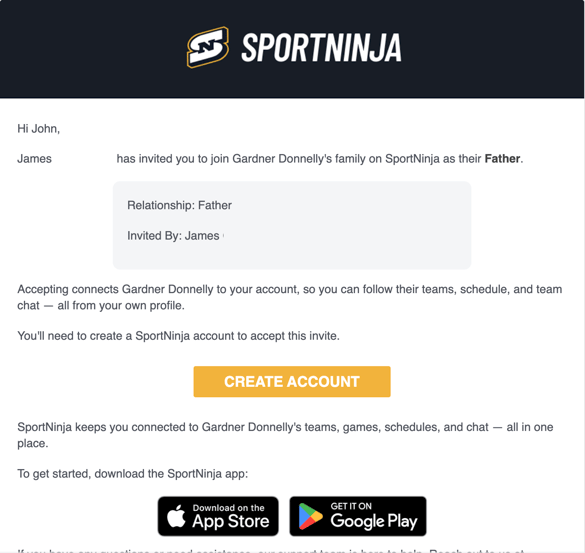
4. Enter family members info and sent invite. They must receive the email and accept this access.
Mobile:
.png?width=343&height=365&name=File%20(75).png)
1. Tap the **Add Family Member** icon in the top-right corner.
*.png?width=339&height=737&name=File%20(76).png)*
1. Enter the family member’s information:
- First and last name
- Email address
- Phone number, if applicable
- Relationship to the player
2. Enable **Has Administrative Access** when the family member should be able to manage the player.
3. Confirm the invitation. The family member must then open the invitation email and accept it to complete the connection.
.png?width=375&height=815&name=File%20(78).png)
Add a Family Member on Web
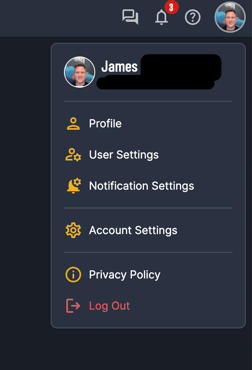
1. Sign in to SportNinja on the web.
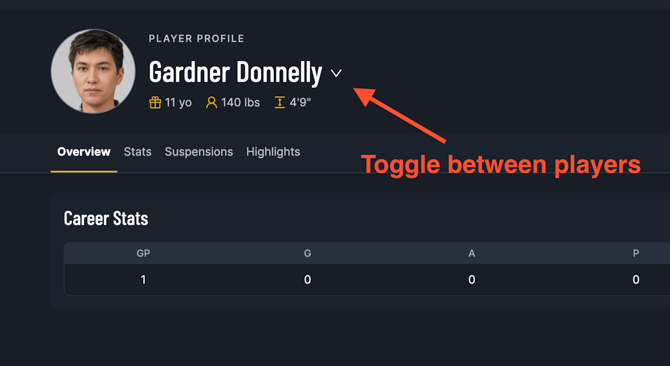
2. Open the appropriate player profile.
3. Select **Family Management** near the top-right of the page.
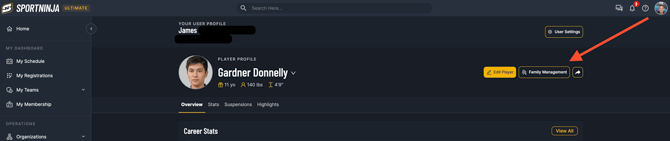
1. Select **Invite Family Member**.
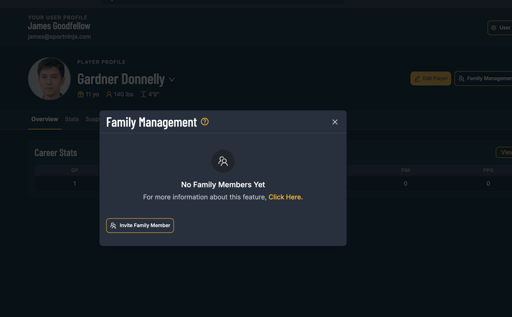
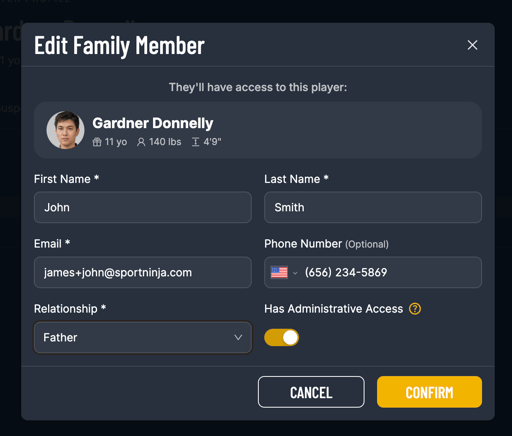
1. Enter the family member’s name, email address, optional phone number, and relationship to the player.
2. Choose whether to enable **Has Administrative Access**.
3. Select **Confirm** to send the invitation. The family member must then open the invitation email and accept it to complete the connection.
Email Invite Example:
Administrative Access
The **Has Administrative Access** setting determines what the invited family member can do.
**Administrative Access enabled:**
The family member can manage the player, including marking attendance and participating in private team chat.
**Administrative Access disabled:**
The family member can follow the player and view schedule updates, but cannot make changes or manage the player.
> **Important:** Enable Administrative Access when adding another parent or guardian who needs to act on behalf of the player.
The invited family member should use the email address entered in the invitation when accessing SportNinja.
- [Getting Started](https://support.sportninja.com/getting-started?hsLang=en)
- [FAQs](https://support.sportninja.com/faqs?hsLang=en)
- [Release Updates](https://support.sportninja.com/release-updates?hsLang=en)
- [Registration & Payments](https://support.sportninja.com/registration-payments?hsLang=en)
- [Support](https://support.sportninja.com/support?hsLang=en)
- [League & Competition Management](https://support.sportninja.com/league-competition-management?hsLang=en#main-content)
- [File Importing/Exporting](https://support.sportninja.com/league-competition-management?hsLang=en#file-importing-exporting)
- [Team & Roster Management](https://support.sportninja.com/team-roster-management?hsLang=en#main-content)
- [Team and Player Management](https://support.sportninja.com/team-roster-management?hsLang=en#team-and-player-management)
- [Team Communication](https://support.sportninja.com/team-roster-management?hsLang=en#team-communication)
- [Team Officials (Mgrs, Reps, Trainers)](https://support.sportninja.com/team-roster-management?hsLang=en#team-officials-mgrs-reps-trainers)
- [Game Attendance](https://support.sportninja.com/team-roster-management?hsLang=en#game-attendance)
- [Team - Schedule](https://support.sportninja.com/team-roster-management?hsLang=en#team-schedule)
- [Scoring & Game Administration](https://support.sportninja.com/scoring-game-administration?hsLang=en#main-content)
- [Game Set up and Scoring](https://support.sportninja.com/scoring-game-administration?hsLang=en#game-set-up-and-scoring)
- [Post-game Edits](https://support.sportninja.com/scoring-game-administration?hsLang=en#post-game-edits)
- [Feed & Communications](https://support.sportninja.com/feed-communications?hsLang=en#main-content)
- [Posts and Communications](https://support.sportninja.com/feed-communications?hsLang=en#posts-and-communications)
- [Integrations](https://support.sportninja.com/integrations?hsLang=en#main-content)
- [DASH Daysmart Integration](https://support.sportninja.com/integrations?hsLang=en#dash-daysmart-integration)
- [Account & Profile Management](https://support.sportninja.com/account-profile-management?hsLang=en)
- [Security & Privacy](https://support.sportninja.com/security-privacy?hsLang=en#main-content)
- [Data Privacy Management](https://support.sportninja.com/security-privacy?hsLang=en#data-privacy-management)
- [Video Streaming & Highlights](https://support.sportninja.com/video-streaming-highlights?hsLang=en#main-content)
- [Video - Upload](https://support.sportninja.com/video-streaming-highlights?hsLang=en#video-upload)
- [Video - Streaming (Broadcasting)](https://support.sportninja.com/video-streaming-highlights?hsLang=en#video-streaming-broadcasting)
- [Platform Overview & Architecture](https://support.sportninja.com/platform-overview-architecture?hsLang=en#main-content)
- [Functionality by Platform](https://support.sportninja.com/platform-overview-architecture?hsLang=en#functionality-by-platform)
- [Platform Overview | Key Concepts](https://support.sportninja.com/platform-overview-architecture?hsLang=en#platform-overview-key-concepts)
- [Roles & Access](https://support.sportninja.com/platform-overview-architecture?hsLang=en#roles-access)
- [Supported Devices & Platforms (OS)](https://support.sportninja.com/platform-overview-architecture?hsLang=en#supported-devices-platforms-os)
- [League & Competition Management 2](https://support.sportninja.com/league-competition-management-2?hsLang=en#main-content)
- [Application Management](https://support.sportninja.com/league-competition-management-2?hsLang=en#application-management)
- [League & Competition Management 3](https://support.sportninja.com/league-competition-management-3?hsLang=en#main-content)
- [Player Administration](https://support.sportninja.com/league-competition-management-3?hsLang=en#player-administration)
- [League & Competition Management 5](https://support.sportninja.com/league-competition-management-5?hsLang=en#main-content)
- [Organization Set up](https://support.sportninja.com/league-competition-management-5?hsLang=en#organization-set-up)
- [League & Competition Management 6](https://support.sportninja.com/league-competition-management-6?hsLang=en#main-content)
- [Tournaments / Playoffs](https://support.sportninja.com/league-competition-management-6?hsLang=en#tournaments-playoffs)
- [League & Competition Management 7](https://support.sportninja.com/league-competition-management-7?hsLang=en)
- [Schedule Creation - Scheduler](https://support.sportninja.com/schedule-creation-scheduler?hsLang=en)
[.png?width=200&height=45&name=00-primary%20(10).png "00-primary (10)")](https://www.sportninja.com/)
[mailto:support@sportninja.com](mailto:support@sportninja.com)
Copyright © 2024, SportNinja