---
title: Importing - Multi-Team Roster Import
description: Importing Multiple Teams, Rosters and Players at one time in a single file
---
[Skip to content](https://support.sportninja.com/importing-multi-team-roster-import#main-content)
[Customer Portal (Login)](https://tickets.sportninja.com/tickets-view?hsLang=en)
[.png?width=180&height=40&name=00-primary%20(10).png)](https://support.sportninja.com/?hsLang=en)
- [Support Center - Articles](https://support.sportninja.com/)
- [Sign-out](https://tickets.sportninja.com/_hcms/mem/logout)
Open main navigation
Close main navigation
- [Support Center - Articles](https://support.sportninja.com/)
- [Sign-out](https://tickets.sportninja.com/_hcms/mem/logout)
- [Customer Portal (Login)](https://tickets.sportninja.com/tickets-view)
- [Create a new ticket](https://share.hsforms.com/1j_homW9dRNmwFUO9hkDq9wqwtlc)
[Create a new ticket](https://share.hsforms.com/1j_homW9dRNmwFUO9hkDq9wqwtlc)
How can we help?
- There are no suggestions because the search field is empty.
1. [SportNinja Support Center](https://support.sportninja.com/?hsLang=en)
2. [League & Competition Management](https://support.sportninja.com/league-competition-management?hsLang=en)
3. [File Importing/Exporting](https://support.sportninja.com/league-competition-management?hsLang=en#file-importing-exporting)
# Importing - Multi-Team Roster Import
**Overview:** For the sake of efficiency, it is possible to import multiple Teams and their associated Rosters all in one file import.
**Steps:**
1. Add your Teams to the Set up tab of the desired Competition.
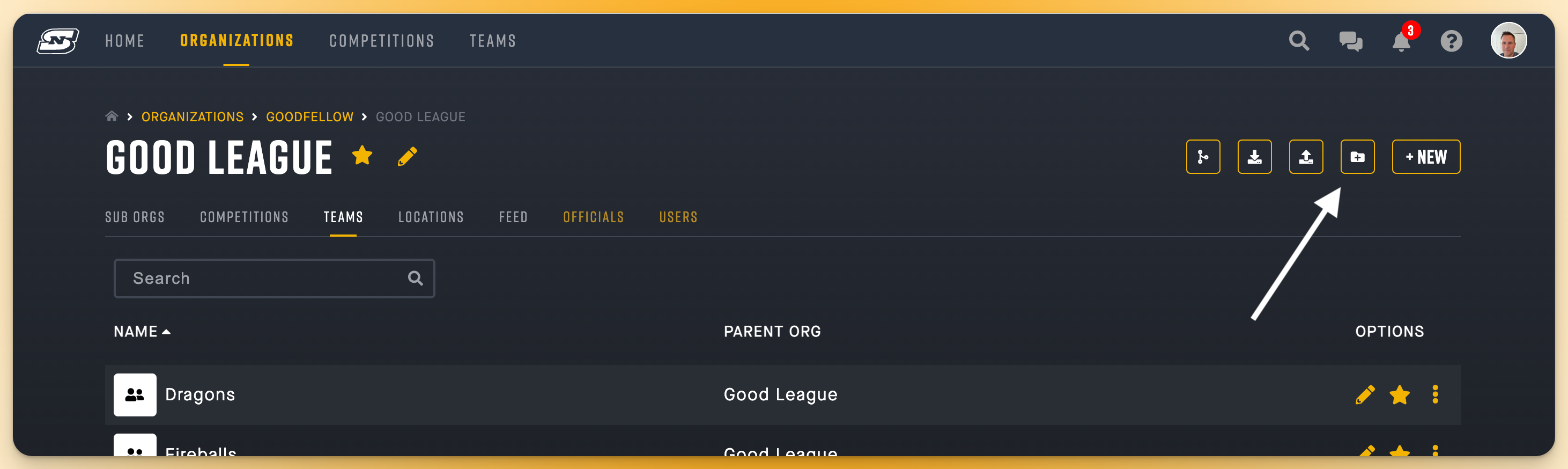
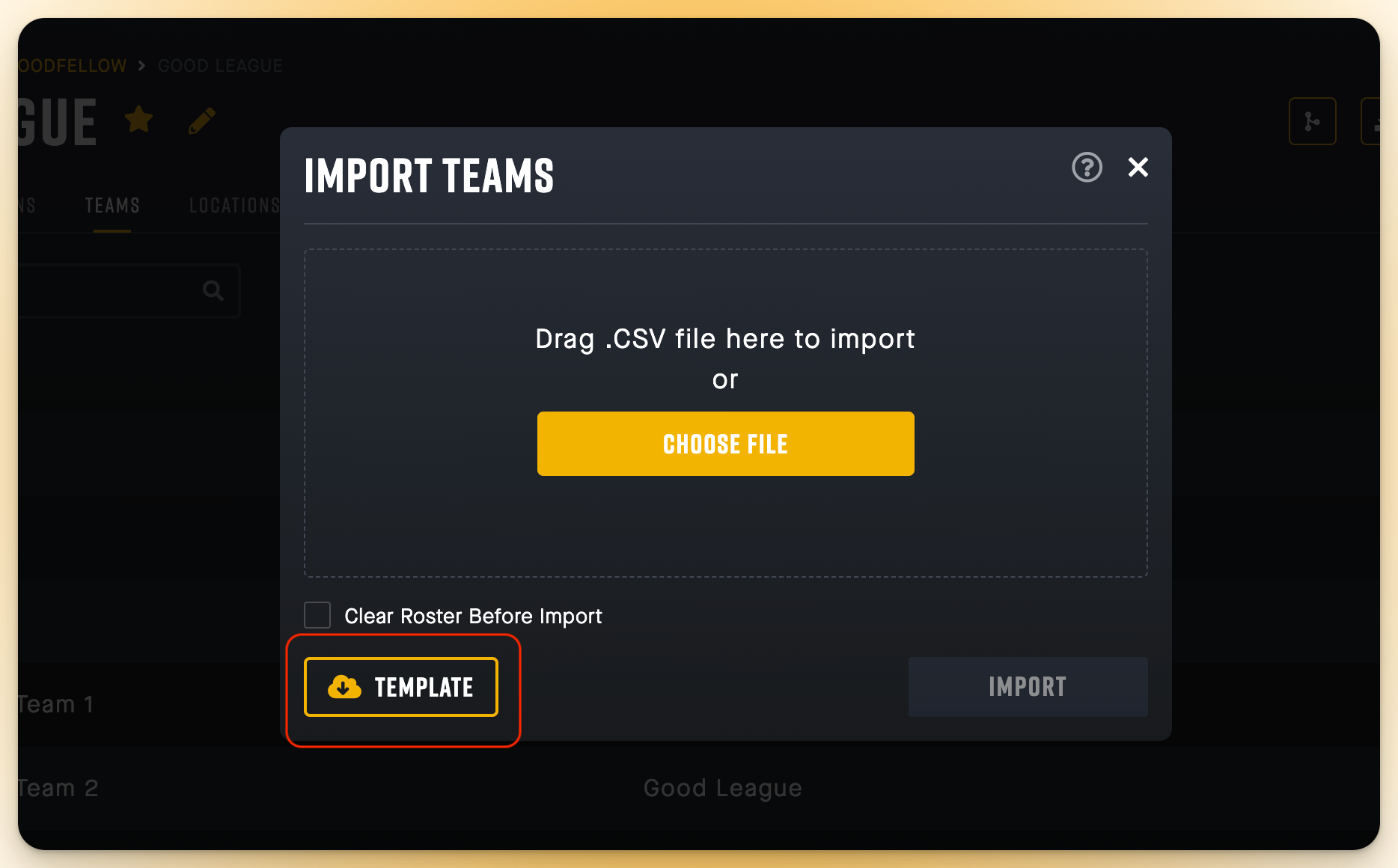
2. Download: Navigate to your Organizations Team page and **Download** a copy of the Multi-Team Roster Import Template file. It will download as a ".csv" file.
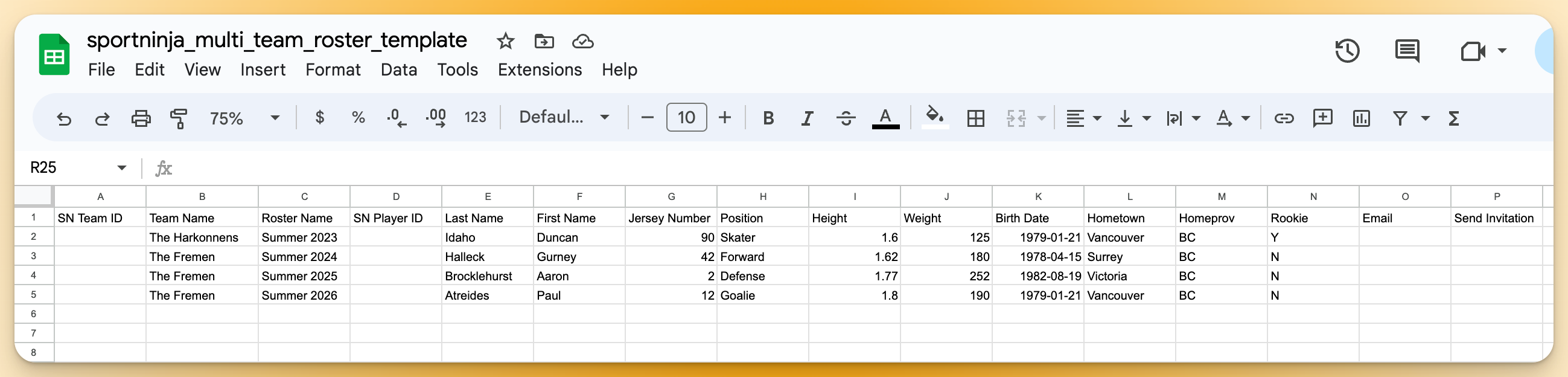
3. Edit: Open the file with an editing tool (eg. MS Excel, Google Sheets, etc). You may want to open it as a .xls, or .xlsx. file to make it easier to edit. Then, **Edit the file** by adding in your Team names and associated Roster/Player data. (Note: that you should not edit the field names at the top, and you cannot add any extra columns. You can only enter data for the fields in the file.)
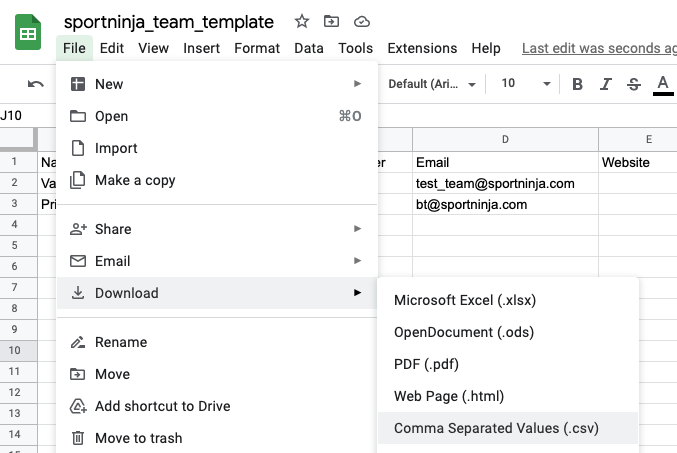
4. Save: Re-save or download your file **as a ".csv" file**, as this format is required for import.
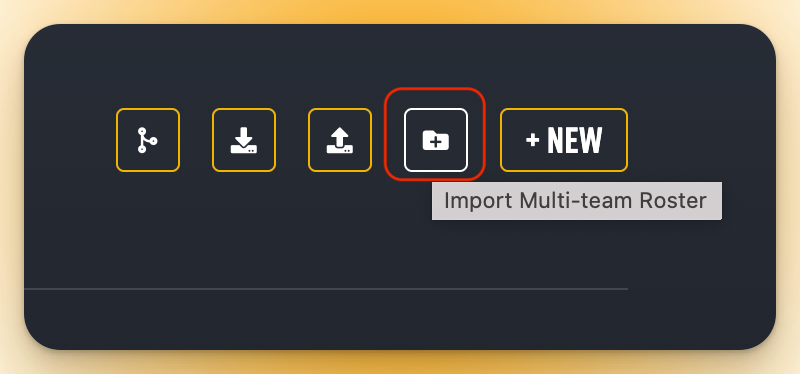
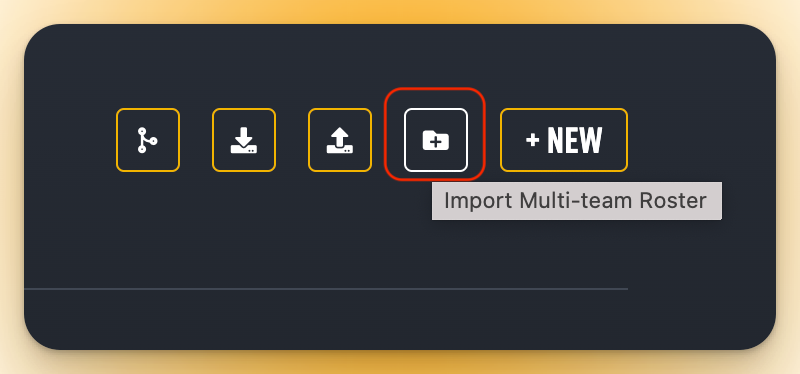
5. Import: Import your updated file by clicking on the "**Multi-Team Roster Import" button**, then select your updated .csv file from its saved location.
If your file was successfully imported, the pop-up window will automatically close after a few seconds. (If your file import was not accepted, you will receive error messages suggesting the route of the issue. Review, update the file as necessary and attempt again.)
**Visual steps:**
1\. Download the file template
2\. Edit
Find the file in your Downloads folder
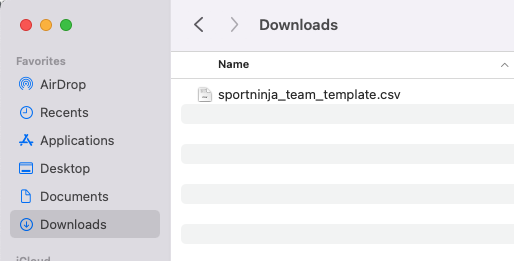
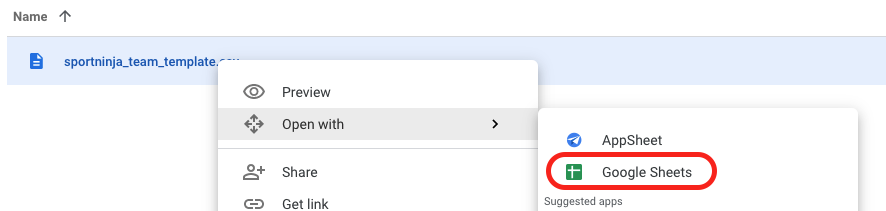
Option A - Upload the file to your Google Drive then open it with Google Sheets.
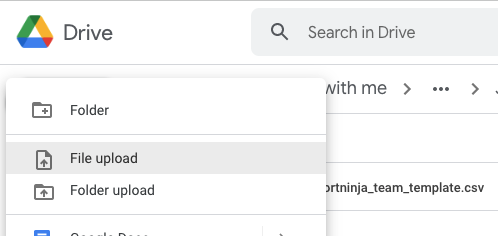
\----
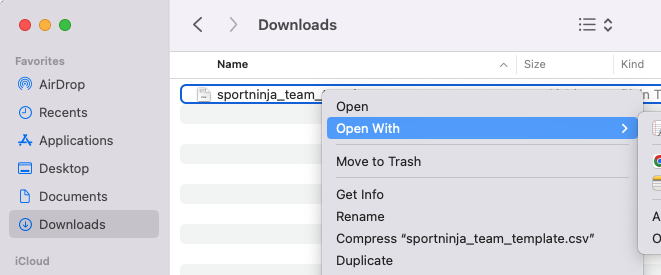
Option B - Open the file with your own editing tool (eg. Excel as a .xls or .xlsx)
Update the file with your new Team and Roster data.
(**Note**: If you do not have an **"**SN Team ID" or "SN Player ID" leave these fields blank and a new Team or Player will be created. This field is a unique identifier used to match against existing teams and players in the system. If you know their IDs, it's recommended you include them)
3\) Save:
Save your file again as a ".csv" file.
4\) Import: Go to the "Import Multi-Team Import" button
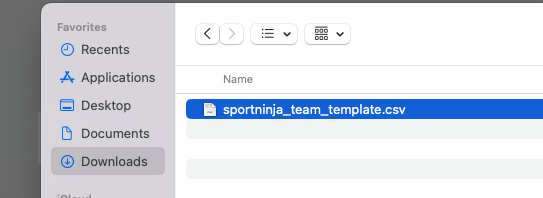
Navigate to your saved file
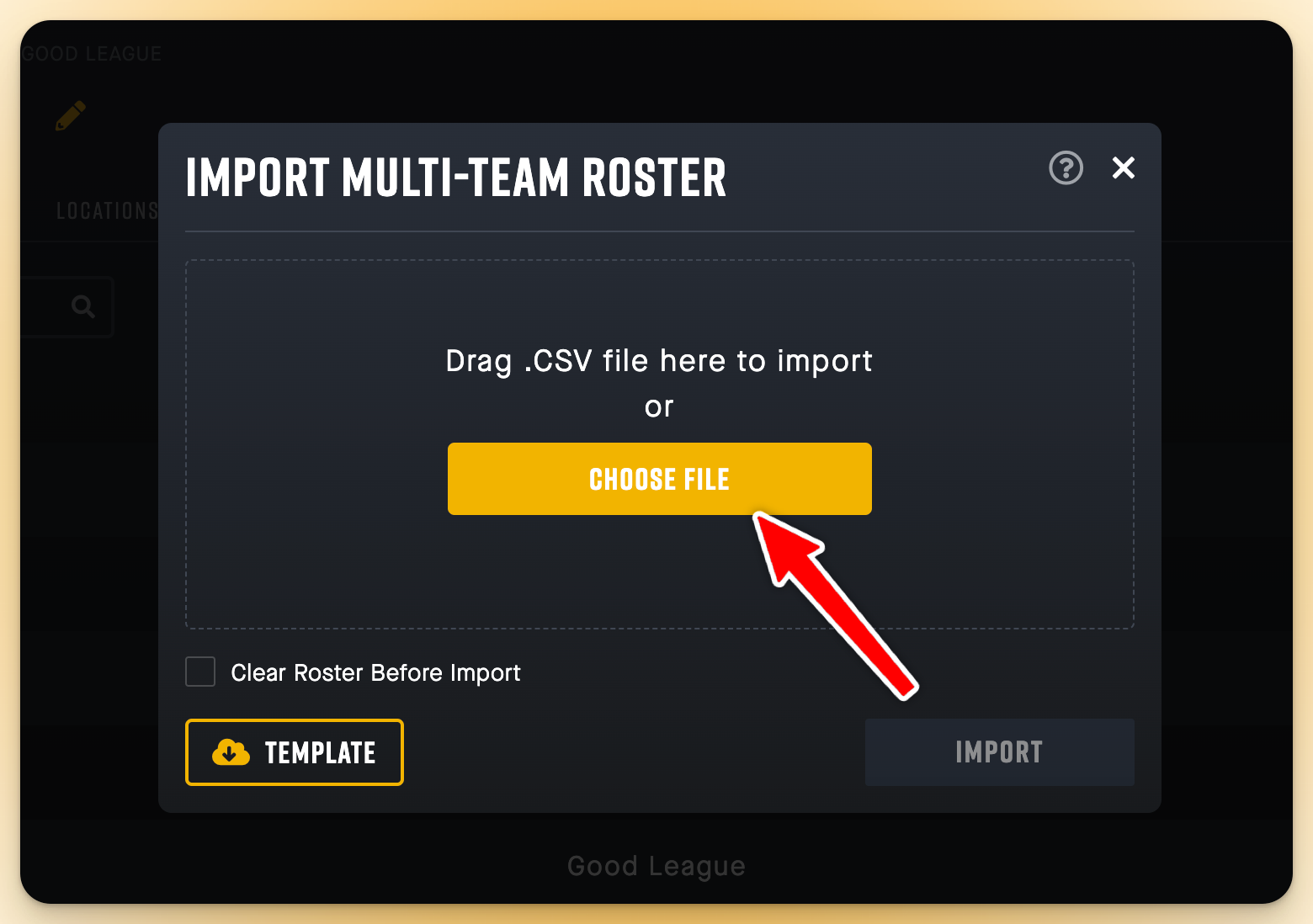
The import button will now be highlighted and selectable.
The file will either import successfully, or it will fail with error messages.
If you are still having trouble, review these articles:
[Import/Export - Troubleshooting](https://support.sportninja.com/knowledge/articles/7866322969748/en-us?brand_id=360001554532&hsLang=en)
[Import/Export - Basics](https://support.sportninja.com/knowledge/articles/7866618990996/en-us?brand_id=360001554532&hsLang=en)
- [Getting Started](https://support.sportninja.com/getting-started?hsLang=en)
- [FAQs](https://support.sportninja.com/faqs?hsLang=en)
- [Release Updates](https://support.sportninja.com/release-updates?hsLang=en)
- [Registration & Payments](https://support.sportninja.com/registration-payments?hsLang=en)
- [Support](https://support.sportninja.com/support?hsLang=en)
- [League & Competition Management](https://support.sportninja.com/league-competition-management?hsLang=en#main-content)
- [File Importing/Exporting](https://support.sportninja.com/league-competition-management?hsLang=en#file-importing-exporting)
- [Events](https://support.sportninja.com/league-competition-management?hsLang=en#events)
- [Team & Roster Management](https://support.sportninja.com/team-roster-management?hsLang=en#main-content)
- [Team and Player Management](https://support.sportninja.com/team-roster-management?hsLang=en#team-and-player-management)
- [Team Communication](https://support.sportninja.com/team-roster-management?hsLang=en#team-communication)
- [Team Officials (Mgrs, Reps, Trainers)](https://support.sportninja.com/team-roster-management?hsLang=en#team-officials-mgrs-reps-trainers)
- [Game Attendance](https://support.sportninja.com/team-roster-management?hsLang=en#game-attendance)
- [Team - Schedule](https://support.sportninja.com/team-roster-management?hsLang=en#team-schedule)
- [Scoring & Game Administration](https://support.sportninja.com/scoring-game-administration?hsLang=en#main-content)
- [Game Set up and Scoring](https://support.sportninja.com/scoring-game-administration?hsLang=en#game-set-up-and-scoring)
- [Post-game Edits](https://support.sportninja.com/scoring-game-administration?hsLang=en#post-game-edits)
- [Feed & Communications](https://support.sportninja.com/feed-communications?hsLang=en#main-content)
- [Posts and Communications](https://support.sportninja.com/feed-communications?hsLang=en#posts-and-communications)
- [Integrations](https://support.sportninja.com/integrations?hsLang=en#main-content)
- [DASH Daysmart Integration](https://support.sportninja.com/integrations?hsLang=en#dash-daysmart-integration)
- [Account & Profile Management](https://support.sportninja.com/account-profile-management?hsLang=en)
- [Security & Privacy](https://support.sportninja.com/security-privacy?hsLang=en#main-content)
- [Data Privacy Management](https://support.sportninja.com/security-privacy?hsLang=en#data-privacy-management)
- [Video Streaming & Highlights](https://support.sportninja.com/video-streaming-highlights?hsLang=en#main-content)
- [Video - Upload](https://support.sportninja.com/video-streaming-highlights?hsLang=en#video-upload)
- [Video - Streaming (Broadcasting)](https://support.sportninja.com/video-streaming-highlights?hsLang=en#video-streaming-broadcasting)
- [Platform Overview & Architecture](https://support.sportninja.com/platform-overview-architecture?hsLang=en#main-content)
- [Functionality by Platform](https://support.sportninja.com/platform-overview-architecture?hsLang=en#functionality-by-platform)
- [Platform Overview | Key Concepts](https://support.sportninja.com/platform-overview-architecture?hsLang=en#platform-overview-key-concepts)
- [Roles & Access](https://support.sportninja.com/platform-overview-architecture?hsLang=en#roles-access)
- [Supported Devices & Platforms (OS)](https://support.sportninja.com/platform-overview-architecture?hsLang=en#supported-devices-platforms-os)
- [League & Competition Management 2](https://support.sportninja.com/league-competition-management-2?hsLang=en#main-content)
- [Application Management](https://support.sportninja.com/league-competition-management-2?hsLang=en#application-management)
- [League & Competition Management 3](https://support.sportninja.com/league-competition-management-3?hsLang=en#main-content)
- [Player Administration](https://support.sportninja.com/league-competition-management-3?hsLang=en#player-administration)
- [League & Competition Management 5](https://support.sportninja.com/league-competition-management-5?hsLang=en#main-content)
- [Organization Set up](https://support.sportninja.com/league-competition-management-5?hsLang=en#organization-set-up)
- [League & Competition Management 6](https://support.sportninja.com/league-competition-management-6?hsLang=en#main-content)
- [Tournaments / Playoffs](https://support.sportninja.com/league-competition-management-6?hsLang=en#tournaments-playoffs)
- [League & Competition Management 7](https://support.sportninja.com/league-competition-management-7?hsLang=en)
- [Schedule Creation - Scheduler](https://support.sportninja.com/schedule-creation-scheduler?hsLang=en)
[.png?width=200&height=45&name=00-primary%20(10).png "00-primary (10)")](https://www.sportninja.com/)
[mailto:support@sportninja.com](mailto:support@sportninja.com)
Copyright © 2024, SportNinja