---
title: Playoff / Tournaments - Set up (Simple version)
description: Playoffs - Simple version
---
[Skip to content](https://support.sportninja.com/playoffs-/-tournaments-set-up-simple-version#main-content)
[Customer Portal (Login)](https://tickets.sportninja.com/tickets-view?hsLang=en)
[.png?width=180&height=40&name=00-primary%20(10).png)](https://support.sportninja.com/?hsLang=en)
- [Support Center - Articles](https://support.sportninja.com/)
- [Sign-out](https://tickets.sportninja.com/_hcms/mem/logout)
Open main navigation
Close main navigation
- [Support Center - Articles](https://support.sportninja.com/)
- [Sign-out](https://tickets.sportninja.com/_hcms/mem/logout)
- [Customer Portal (Login)](https://tickets.sportninja.com/tickets-view)
- [Create a new ticket](https://share.hsforms.com/1j_homW9dRNmwFUO9hkDq9wqwtlc)
[Create a new ticket](https://share.hsforms.com/1j_homW9dRNmwFUO9hkDq9wqwtlc)
How can we help?
- There are no suggestions because the search field is empty.
1. [SportNinja Support Center](https://support.sportninja.com/?hsLang=en)
2. [League & Competition Management 6](https://support.sportninja.com/league-competition-management-6?hsLang=en)
3. [Tournaments / Playoffs](https://support.sportninja.com/league-competition-management-6?hsLang=en#tournaments-playoffs)
# Playoff / Tournaments - Set up (Simple version)
**Overview:** A Playoff competition can be created by "cloning" or copying an existing season or competition, or by creating one from scratch.
Cloning an existing competition is most common and effective, as it allows you to automatically copy over all existing teams and rosters from the regular season, but it's created with a no schedule.
**Simple Version:** Run playoffs just like the regular season, but using Placeholder Teams for TBD game slots. This is currently recommended for small leagues with uncomplicated playoff set-ups. **If you're using this process, please read full details at the bottom of this page.**
Steps:
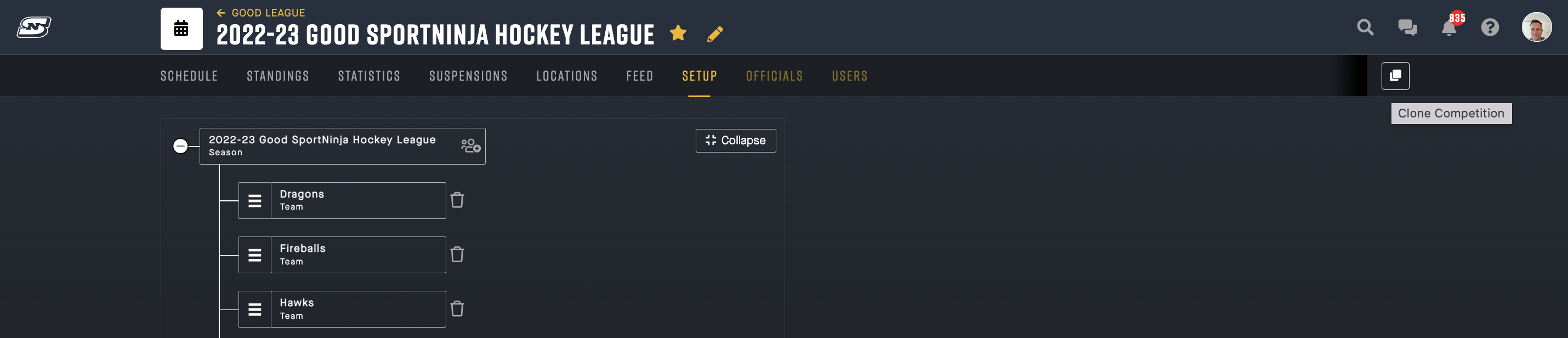
1. **Clone a Competition** (eg. regular season): Rename the Competition to Playoffs, update your date, and leave the "Playoffs" flag **OFF**.
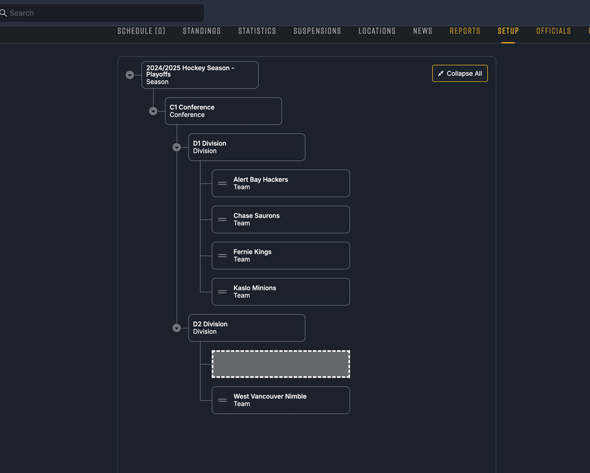
2. **Update Set up** tab of the Playoff competition: by editing the Division structure (dragging and dropping teams) if needed. For example, if you are splitting divisions into 2 for the playoffs.
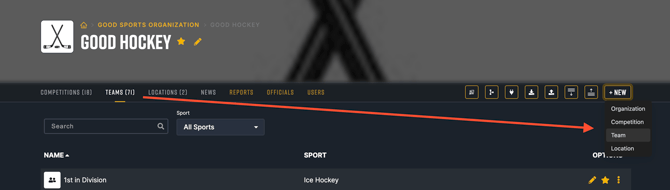
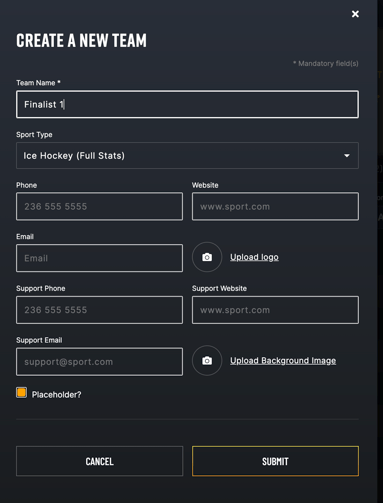
3. **Add Placeholder Teams:** From the Teams tab, add Placeholder teams using the "placeholder" checkbox for all games you need to display where you do not know which teams will be involved yet. (Note: you no longer need to add Placeholder teams to the Set up tab)
4. Import/add your **Schedule**: Add your game schedule as normal, instructions [here](https://support.sportninja.com/importing-game-schedules-for-a-competition?hsLang=en), but keep in mind your placeholder team names must be in the system prior to importing and the names must identically match what's in your import file.
5. Run your tournament and **update your Placeholder teams** with the actual team names (winners) as they become apparent.
Visual Steps:
1\. Clone Competition from the Set up tab of an existing Competition.
2\. **Update Set up** tab of the Playoff competition: by editing the Division structure (dragging and dropping teams) if needed. For example, if you are splitting divisions into 2 for the playoffs.
3\. Go to **Teams** tab and add or update Placeholder (TBD) teams with a placeholder flag - these will be used for games where you need to display the schedule but do not know which teams will be involved yet. Placeholder teams can be re-used for any game. The placeholder flag will also prevent them from showing up in the Stats/Standings pages.
**(Note: you no longer need to add Placeholder teams to the Set up tab!)**
4\. Import/add your **Schedule**: Add your game schedule as normal, instructions [here](https://support.sportninja.com/importing-game-schedules-for-a-competition?hsLang=en), but keep in mind your placeholder team names must be in the system prior to importing and the names must identically match what's in your import file.
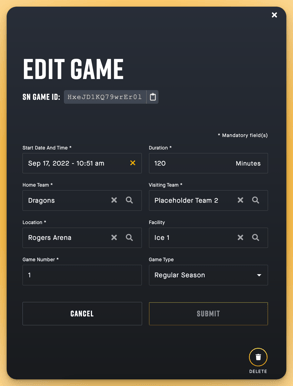
5\. Run your Playoff and **update Placeholder teams** for each game (as winners advance) - either manually as below, or with file import updates.
\---------------------------------
Further Details on Placeholder Team Usage: PLEASE READ!
Here’s the best way to handle playoff scheduling when the actual teams are not known yet.
You’ll want to use **placeholder teams**. These are teams created in the system with the **Placeholder** checkbox enabled. They are only used for scheduling purposes and will never have rosters attached to them.
A few notes on how this works:
- You can reuse the same placeholder teams across multiple games.
- First, review which placeholder teams already exist in your system.
- Then create any additional placeholder teams you need on the **Teams** tab.
The naming is completely up to you, as long as it makes sense for your schedule. For example, you could use names like **U9 Gold A** and **U9 Gold B**, or something more generic like **Winner A** vs **Winner B**.
Once those placeholder teams are set up, you can import your schedule using our schedule import format. For each game, make sure the **division** is specified in the import file, since placeholder teams are not added to the Setup tab and the system needs to know which division each game belongs to.
To recap, the process is:
- Identify the placeholder team names you need.
- Check which placeholder teams already exist in the system.
- Add any new placeholder teams on the **Teams** tab.
- Import your schedule.
As long as the team names in the schedule match the placeholder team names in the system exactly, it should work well.
When the actual teams are confirmed, you can update the game by replacing the placeholder team with the real team. This can be done on mobile or on the web.
- [Getting Started](https://support.sportninja.com/getting-started?hsLang=en)
- [FAQs](https://support.sportninja.com/faqs?hsLang=en)
- [Release Updates](https://support.sportninja.com/release-updates?hsLang=en)
- [Registration & Payments](https://support.sportninja.com/registration-payments?hsLang=en)
- [Support](https://support.sportninja.com/support?hsLang=en)
- [League & Competition Management](https://support.sportninja.com/league-competition-management?hsLang=en#main-content)
- [File Importing/Exporting](https://support.sportninja.com/league-competition-management?hsLang=en#file-importing-exporting)
- [Events](https://support.sportninja.com/league-competition-management?hsLang=en#events)
- [Team & Roster Management](https://support.sportninja.com/team-roster-management?hsLang=en#main-content)
- [Team and Player Management](https://support.sportninja.com/team-roster-management?hsLang=en#team-and-player-management)
- [Team Communication](https://support.sportninja.com/team-roster-management?hsLang=en#team-communication)
- [Team Officials (Mgrs, Reps, Trainers)](https://support.sportninja.com/team-roster-management?hsLang=en#team-officials-mgrs-reps-trainers)
- [Game Attendance](https://support.sportninja.com/team-roster-management?hsLang=en#game-attendance)
- [Team - Schedule](https://support.sportninja.com/team-roster-management?hsLang=en#team-schedule)
- [Scoring & Game Administration](https://support.sportninja.com/scoring-game-administration?hsLang=en#main-content)
- [Game Set up and Scoring](https://support.sportninja.com/scoring-game-administration?hsLang=en#game-set-up-and-scoring)
- [Post-game Edits](https://support.sportninja.com/scoring-game-administration?hsLang=en#post-game-edits)
- [Feed & Communications](https://support.sportninja.com/feed-communications?hsLang=en#main-content)
- [Posts and Communications](https://support.sportninja.com/feed-communications?hsLang=en#posts-and-communications)
- [Integrations](https://support.sportninja.com/integrations?hsLang=en#main-content)
- [DASH Daysmart Integration](https://support.sportninja.com/integrations?hsLang=en#dash-daysmart-integration)
- [Account & Profile Management](https://support.sportninja.com/account-profile-management?hsLang=en)
- [Security & Privacy](https://support.sportninja.com/security-privacy?hsLang=en#main-content)
- [Data Privacy Management](https://support.sportninja.com/security-privacy?hsLang=en#data-privacy-management)
- [Video Streaming & Highlights](https://support.sportninja.com/video-streaming-highlights?hsLang=en#main-content)
- [Video - Upload](https://support.sportninja.com/video-streaming-highlights?hsLang=en#video-upload)
- [Video - Streaming (Broadcasting)](https://support.sportninja.com/video-streaming-highlights?hsLang=en#video-streaming-broadcasting)
- [Platform Overview & Architecture](https://support.sportninja.com/platform-overview-architecture?hsLang=en#main-content)
- [Functionality by Platform](https://support.sportninja.com/platform-overview-architecture?hsLang=en#functionality-by-platform)
- [Platform Overview | Key Concepts](https://support.sportninja.com/platform-overview-architecture?hsLang=en#platform-overview-key-concepts)
- [Roles & Access](https://support.sportninja.com/platform-overview-architecture?hsLang=en#roles-access)
- [Supported Devices & Platforms (OS)](https://support.sportninja.com/platform-overview-architecture?hsLang=en#supported-devices-platforms-os)
- [League & Competition Management 2](https://support.sportninja.com/league-competition-management-2?hsLang=en#main-content)
- [Application Management](https://support.sportninja.com/league-competition-management-2?hsLang=en#application-management)
- [League & Competition Management 3](https://support.sportninja.com/league-competition-management-3?hsLang=en#main-content)
- [Player Administration](https://support.sportninja.com/league-competition-management-3?hsLang=en#player-administration)
- [League & Competition Management 5](https://support.sportninja.com/league-competition-management-5?hsLang=en#main-content)
- [Organization Set up](https://support.sportninja.com/league-competition-management-5?hsLang=en#organization-set-up)
- [League & Competition Management 6](https://support.sportninja.com/league-competition-management-6?hsLang=en#main-content)
- [Tournaments / Playoffs](https://support.sportninja.com/league-competition-management-6?hsLang=en#tournaments-playoffs)
- [League & Competition Management 7](https://support.sportninja.com/league-competition-management-7?hsLang=en)
- [Schedule Creation - Scheduler](https://support.sportninja.com/schedule-creation-scheduler?hsLang=en)
[.png?width=200&height=45&name=00-primary%20(10).png "00-primary (10)")](https://www.sportninja.com/)
[mailto:support@sportninja.com](mailto:support@sportninja.com)
Copyright © 2024, SportNinja