---
title: Registration - Currency Settings
description: Currency
---
[Skip to content](https://support.sportninja.com/registration-currency-settings#main-content)
[Customer Portal (Login)](https://tickets.sportninja.com/?hsLang=en)
[.png?width=180&height=40&name=00-primary%20(10).png)](https://support.sportninja.com/?hsLang=en)
- [Support Center - Articles](https://support.sportninja.com/)
- [Sign-out](https://tickets.sportninja.com/_hcms/mem/logout)
Open main navigation
Close main navigation
- [Support Center - Articles](https://support.sportninja.com/)
- [Sign-out](https://tickets.sportninja.com/_hcms/mem/logout)
- [Customer Portal (Login)](https://tickets.sportninja.com/)
- [Create a new ticket](https://share.hsforms.com/1j_homW9dRNmwFUO9hkDq9wqwtlc)
[Create a new ticket](https://share.hsforms.com/1j_homW9dRNmwFUO9hkDq9wqwtlc)
How can we help?
- There are no suggestions because the search field is empty.
1. [SportNinja Support Center](https://support.sportninja.com/?hsLang=en)
2. [Registration & Payments](https://support.sportninja.com/registration-payments?hsLang=en)
# Registration - Currency Settings
### Payment Providers & Currency Settings
#### Overview
For each **competition and registration**, administrators can define:
- The **Payment Transaction Provider**
- The **Currency** in which payments will be processed
These settings are configured at the competition level and apply to all registrations within that competition.
This allows organizations operating in multiple countries or regions to manage payments cleanly and consistently.
---
#### Supported Payment Providers
### Stripe (International Payments)
SportNinja integrates with **Stripe** to support:
- International payment processing
- Multiple global currencies
- Credit and debit card payments
- Secure online checkout
Any currency supported by Stripe can be selected within SportNinja.
Stripe is recommended for:
- Organizations operating outside North America
- Multi-currency environments
- International tournaments or events
---
### SportsPay (North America)
SportsPay supports:
- USD (United States Dollar)
- CAD (Canadian Dollar)
This provider is commonly used by North American organizations that prefer a domestic payment processor.
---
#### How Currency Selection Works
When setting up or editing a competition:
1. Navigate to the **Competition Settings - \> Registration Settings**
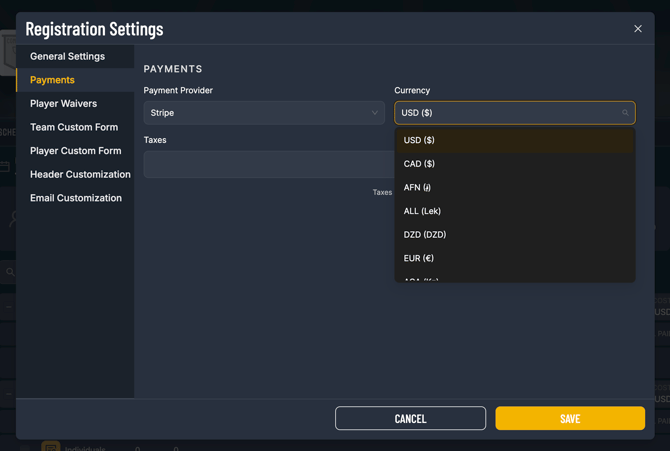
2. Select your **Payment Transaction Provider**
3. Choose your **Currency** from the dropdown list
4. Save your settings
Once selected:
- All registration fees display in the chosen currency
- All payments are processed in that currency
- Receipts and confirmation emails reflect the selected currency
- Reporting and financial summaries align with that currency
The selected currency applies to the entire competition and cannot vary within a single registration.
Competition -\> Registration -\> (Configuration Wheel)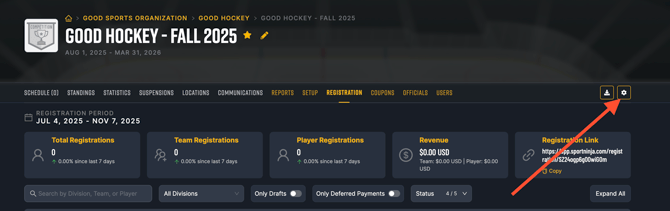
---
#### Important Notes
- Currency settings are competition-specific.
- If you operate multiple competitions in different countries, each competition can have its own currency.
- Payment provider availability may depend on your organization’s configuration and location.
---
If you need assistance configuring Stripe or SportsPay, please contact SportNinja Support through the Help Center or at support@sportninja.com
- [Getting Started](https://support.sportninja.com/getting-started?hsLang=en)
- [FAQs](https://support.sportninja.com/faqs?hsLang=en)
- [Release Updates](https://support.sportninja.com/release-updates?hsLang=en)
- [Registration & Payments](https://support.sportninja.com/registration-payments?hsLang=en)
- [Support](https://support.sportninja.com/support?hsLang=en)
- [League & Competition Management](https://support.sportninja.com/league-competition-management?hsLang=en#main-content)
- [File Importing/Exporting](https://support.sportninja.com/league-competition-management?hsLang=en#file-importing-exporting)
- [Team & Roster Management](https://support.sportninja.com/team-roster-management?hsLang=en#main-content)
- [Team and Player Management](https://support.sportninja.com/team-roster-management?hsLang=en#team-and-player-management)
- [Team Communication](https://support.sportninja.com/team-roster-management?hsLang=en#team-communication)
- [Team Officials (Mgrs, Reps, Trainers)](https://support.sportninja.com/team-roster-management?hsLang=en#team-officials-mgrs-reps-trainers)
- [Game Attendance](https://support.sportninja.com/team-roster-management?hsLang=en#game-attendance)
- [Team - Schedule](https://support.sportninja.com/team-roster-management?hsLang=en#team-schedule)
- [Scoring & Game Administration](https://support.sportninja.com/scoring-game-administration?hsLang=en#main-content)
- [Game Set up and Scoring](https://support.sportninja.com/scoring-game-administration?hsLang=en#game-set-up-and-scoring)
- [Post-game Edits](https://support.sportninja.com/scoring-game-administration?hsLang=en#post-game-edits)
- [Feed & Communications](https://support.sportninja.com/feed-communications?hsLang=en#main-content)
- [Posts and Communications](https://support.sportninja.com/feed-communications?hsLang=en#posts-and-communications)
- [Integrations](https://support.sportninja.com/integrations?hsLang=en#main-content)
- [DASH Daysmart Integration](https://support.sportninja.com/integrations?hsLang=en#dash-daysmart-integration)
- [Account & Profile Management](https://support.sportninja.com/account-profile-management?hsLang=en)
- [Security & Privacy](https://support.sportninja.com/security-privacy?hsLang=en#main-content)
- [Data Privacy Management](https://support.sportninja.com/security-privacy?hsLang=en#data-privacy-management)
- [Video Streaming & Highlights](https://support.sportninja.com/video-streaming-highlights?hsLang=en#main-content)
- [Video - Upload](https://support.sportninja.com/video-streaming-highlights?hsLang=en#video-upload)
- [Video - Streaming (Broadcasting)](https://support.sportninja.com/video-streaming-highlights?hsLang=en#video-streaming-broadcasting)
- [Platform Overview & Architecture](https://support.sportninja.com/platform-overview-architecture?hsLang=en#main-content)
- [Functionality by Platform](https://support.sportninja.com/platform-overview-architecture?hsLang=en#functionality-by-platform)
- [Platform Overview | Key Concepts](https://support.sportninja.com/platform-overview-architecture?hsLang=en#platform-overview-key-concepts)
- [Roles & Access](https://support.sportninja.com/platform-overview-architecture?hsLang=en#roles-access)
- [Supported Devices & Platforms (OS)](https://support.sportninja.com/platform-overview-architecture?hsLang=en#supported-devices-platforms-os)
- [League & Competition Management 2](https://support.sportninja.com/league-competition-management-2?hsLang=en#main-content)
- [Application Management](https://support.sportninja.com/league-competition-management-2?hsLang=en#application-management)
- [League & Competition Management 3](https://support.sportninja.com/league-competition-management-3?hsLang=en#main-content)
- [Player Administration](https://support.sportninja.com/league-competition-management-3?hsLang=en#player-administration)
- [League & Competition Management 5](https://support.sportninja.com/league-competition-management-5?hsLang=en#main-content)
- [Organization Set up](https://support.sportninja.com/league-competition-management-5?hsLang=en#organization-set-up)
- [League & Competition Management 6](https://support.sportninja.com/league-competition-management-6?hsLang=en#main-content)
- [Tournaments / Playoffs](https://support.sportninja.com/league-competition-management-6?hsLang=en#tournaments-playoffs)
- [League & Competition Management 7](https://support.sportninja.com/league-competition-management-7?hsLang=en)
- [Schedule Creation - Scheduler](https://support.sportninja.com/schedule-creation-scheduler?hsLang=en)
[.png?width=200&height=45&name=00-primary%20(10).png "00-primary (10)")](https://www.sportninja.com/)
[mailto:support@sportninja.com](mailto:support@sportninja.com)
Copyright © 2024, SportNinja