.png?width=180&height=40&name=00-primary%20(10).png)
Every person in SportNinja has one or more roles. Your role decides what you can see and do - from managing a whole league down to marking your own game attendance. Use this guide to find your role and understand exactly what it unlocks.
Last updated: August 2026
How roles work
Roles sit in a hierarchy. The higher up you're invited, the more you can manage:
League Administration → Officials → Team Management → Players → Followers
- Roles are additive. You can hold more than one, and your access is the sum of all of them.
- Your “user” is your login, not a role. Your email connects to whatever roles you've been invited into and accepted.
- Invites set your level. You're granted a role at a specific point in the hierarchy (an organization, a competition, or a team).
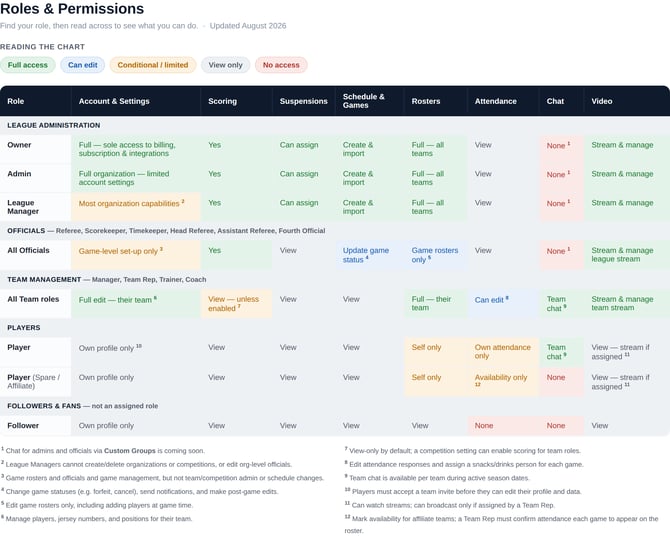
Roles in detail
League Administration
Owner — The account holder. Sole access to the SportNinja subscription, integrations, waivers, and payments/taxes, plus full organization capabilities.
Admin — Full organization capabilities with limited access to account settings.
League Manager — Most organization capabilities, except creating/deleting organizations or competitions and editing organization-level officials.
Officials
Referee, Scorekeeper, Timekeeper, Head Referee, Assistant Referee, and Fourth Official all share the same access. They handle everything at the game level:
- Game set-up — rosters and officials
- Game scoring and game-status updates (forfeit, cancel)
- Post-game edits
- Excludes schedule changes and team/competition admin.
Team Management (Team Officials)
Manager, Team Rep, Trainer, and Coach share the same access, focused on running their own team:
- Full team edit — manage players, jersey numbers, and positions
- Add/edit and import/export their team's roster
- Edit attendance responses and assign a snacks/drinks person per game
- Team chat during active season dates
- Scoring is view-only unless a competition setting enables it
Players
Player — Update your own profile and mark your own game attendance. You must accept a team invite before you can make edits. Team chat is available during active season dates.
Player (Spare / Affiliate) — Same as a Player, but you mark availability for teams you're an affiliate on; a Team Rep confirms your attendance each game before you appear on the roster. No team chat.
Followers & Fans
Not a defined role — anyone can download the SportNinja app and follow any public league or team. Followers update their own profile and watch public content, with no access to attendance or chat.
A note on “Users”
A user isn't a role — it's the email you log in with. Your login connects to your player profiles (through team invites) and any organization roles you've accepted, and your permissions come from those roles. From your user account you can update your profile, email/password, and account settings, and manage Family — sending invites to connect additional family members to child profiles.
Choosing the right role
Invite at the right level. Grant a role where the person will actually work. Invite a League Manager to a sub-organization if they'll oversee multiple seasons or tournaments — or to a single competition if their involvement is isolated to that one event.
Keep roles to a minimum. Roles are additive, so combine where you can. If someone would be both a League Manager and a Scorekeeper, inviting them as an Admin often covers both in a single role.