.png?width=180&height=40&name=00-primary%20(10).png)
Overview: SportNinja supports multiple leading payment provider options including Stripe. Your Payment Provider is the company used for processing credit cards and other transactions - and the means with which you will receive payment/revenue distributions.
Access Required: You must be the Account Owner to configure the Registration Payment Provider. You can do so under the Account Settings dropdown within the profile section on the SportNinja web/desktop platform.
NOTE: If you are setting up your SportNinja Account for the first time - use this link to create your account and these steps to get started!
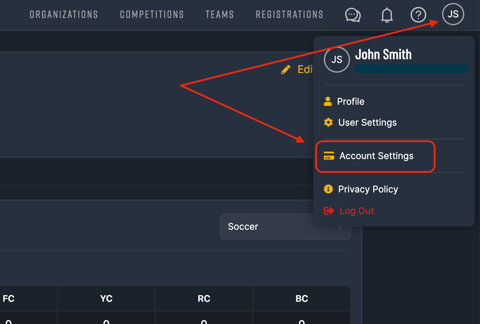
From Account Settings -> Payment Provider tab you can begin setting up your payment provider (Note: you will only need to do this once)
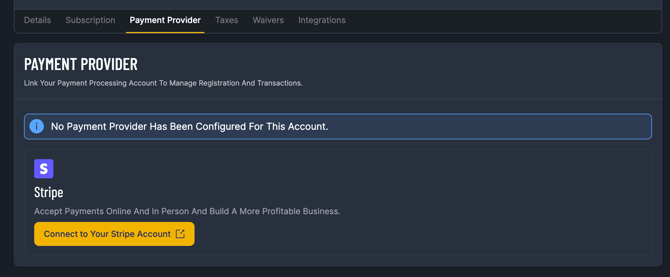
Payment Processor Enablement/Confirmation:
Once you submit your Business and Account information to the Payment Provider they are fairly quick to review and confirm.
Timeline for confirmation: It can take anywhere from a couple of hours up to a 1-2 business days. If you have any questions you can reach out directly with the contact info from each provider (or if needed request a status update from SportNinja).
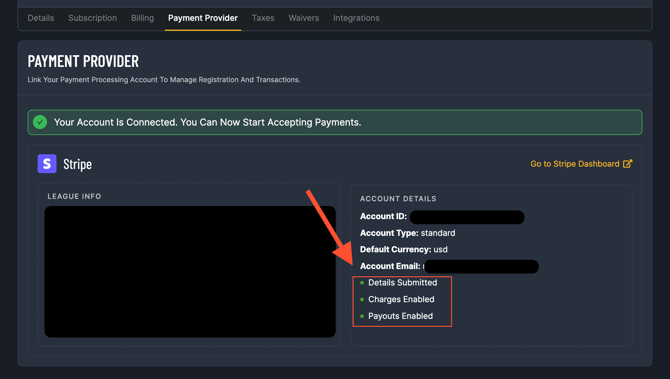
Once fully configured, your Payment Provider tab in SportNinja will display like the following with a green status indicators on the right side indicating:
- "Charges Enabled" and
- "Payouts Enabled"
At this point you can safely share your Registration URL link and start taking Payments.