---
title: Suspensions
description: SportNinja Support Center
---
[Skip to content](https://support.sportninja.com/suspensions#main-content)
[Customer Portal (Login)](https://tickets.sportninja.com/tickets-view?hsLang=en)
[.png?width=180&height=40&name=00-primary%20(10).png)](https://support.sportninja.com/?hsLang=en)
- [Support Center - Articles](https://support.sportninja.com/)
- [Sign-out](https://tickets.sportninja.com/_hcms/mem/logout)
Open main navigation
Close main navigation
- [Support Center - Articles](https://support.sportninja.com/)
- [Sign-out](https://tickets.sportninja.com/_hcms/mem/logout)
- [Customer Portal (Login)](https://tickets.sportninja.com/tickets-view)
- [Create a new ticket](https://share.hsforms.com/1j_homW9dRNmwFUO9hkDq9wqwtlc)
[Create a new ticket](https://share.hsforms.com/1j_homW9dRNmwFUO9hkDq9wqwtlc)
How can we help?
- There are no suggestions because the search field is empty.
1. [SportNinja Support Center](https://support.sportninja.com/?hsLang=en)
2. [League & Competition Management 3](https://support.sportninja.com/league-competition-management-3?hsLang=en)
3. [Player Administration](https://support.sportninja.com/league-competition-management-3?hsLang=en#player-administration)
# Suspensions
### Overview
This article will review the process to manage Suspensions for your Competitions. If you prefer to watch a short video walkthrough of the process, [click this link](https://youtu.be/7bi08RaiKww).
**Note: Currently Suspensions can only be applied at the Competition Level.** The SportNinja development team is working on a feature that will allow suspensions to be assessed at the Organization level and applied across multiple Competitions. This feature will be available in the near future.
This support document will cover how to:
- [Add a New Suspension](https://45201360.hs-sites.com/support-center/suspensions?hsLang=en#h_01GGRSXJ9A7VS4M871BMG4ZQPX)
- [Edit a Suspension](https://45201360.hs-sites.com/support-center/suspensions?hsLang=en#h_01GGRTP11S3QT1VAZZEQ1T88HQ)
- [Delete a Suspension](https://45201360.hs-sites.com/support-center/suspensions?hsLang=en#h_01GGRTP9WBHYTKTQ9MDX5BNTYM)
### How do I Add a New Suspension?
### Directions:
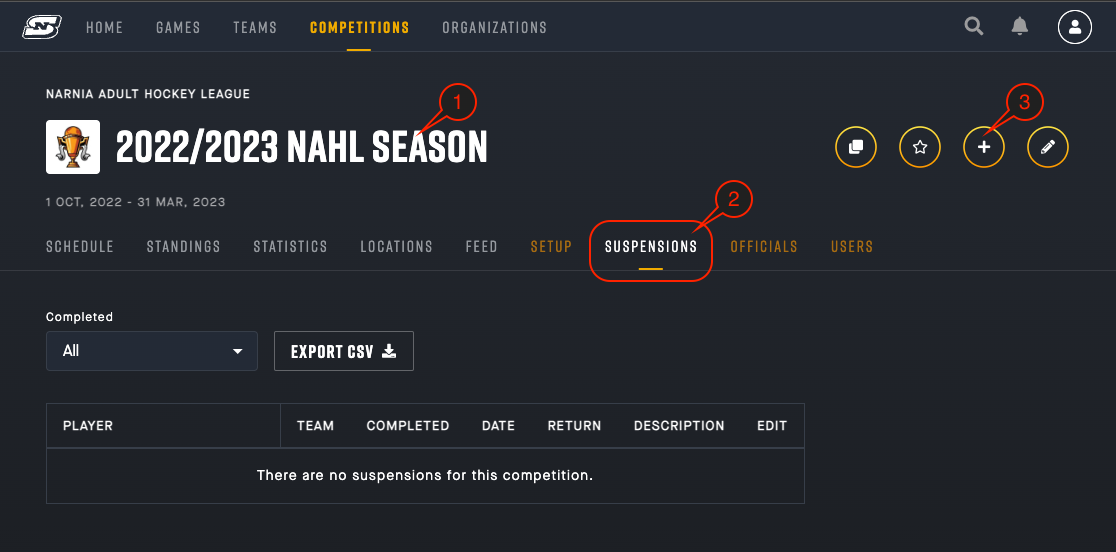
1. Navigate to the **Competition** page in which you want to create a new suspension.
2. In the Competition tab bar, click on the “**Suspensions**” button.
3. In the Competition header, click on the “**Add New Suspension**” button. This will open a side menu that will allow you to input the suspension details.
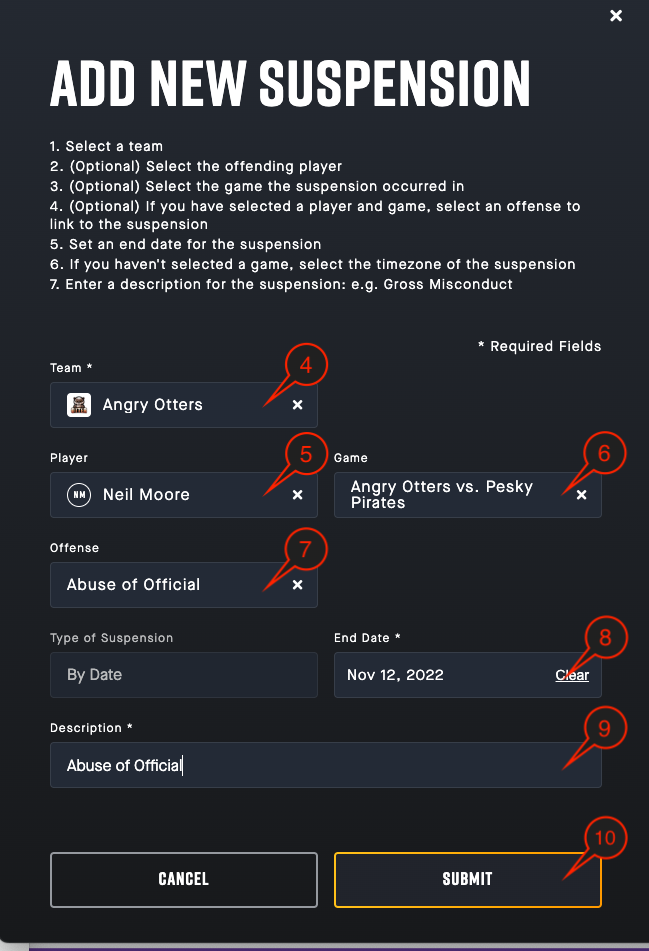
4. From the **Team** dropdown menu, select the team of the player you wish to suspend.
5. Then, use the **Player** dropdown menu to select the player you wish to suspend.
6. (Optional) You may wish to link the suspension to the game in which the infraction occurred, to do so, select the appropriate game from the **Game** dropdown menu.
7. (Optional) You may wish to link the suspension to an in-game penalty, to do so, select the appropriate penalty from the **Offense** dropdown menu.
8. Finally, select the **End Date** for the suspension.
Note: The End Date is the first day that the player will be allowed to return to play. They will be eligible to play in games scheduled on this date.
9. Enter a **Description** for the suspension.
Note: The Description will be shared with league admins, team reps, and the offending player.
10. Click the "Submit" button to complete adding the New Suspension.
### How do I Edit a Suspension?
### Directions:
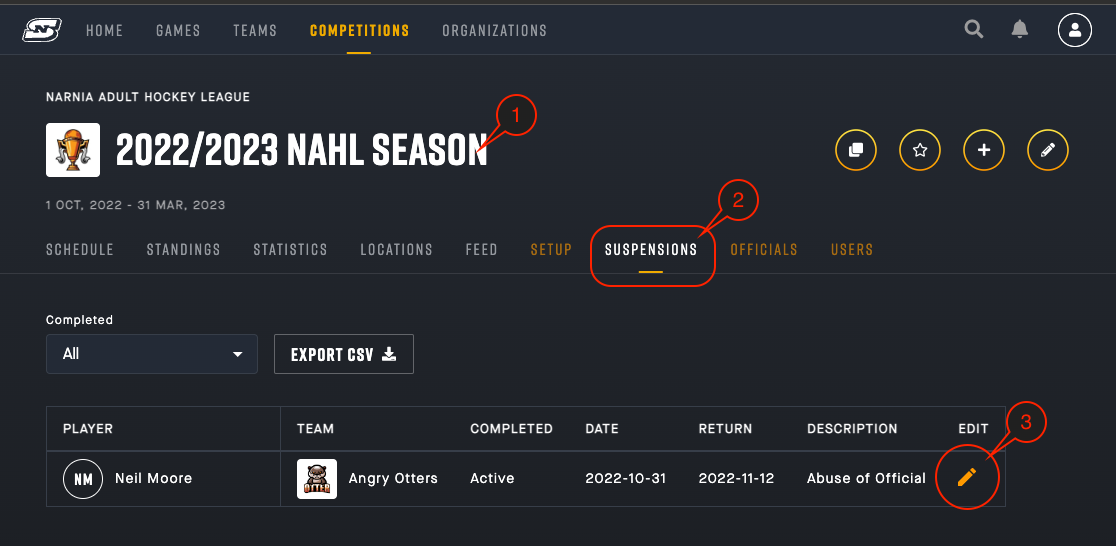
1. Navigate to the **Competition** page in which you want to edit an existing suspension.
2. In the Competition tab bar, click on the “**Suspensions**” button.
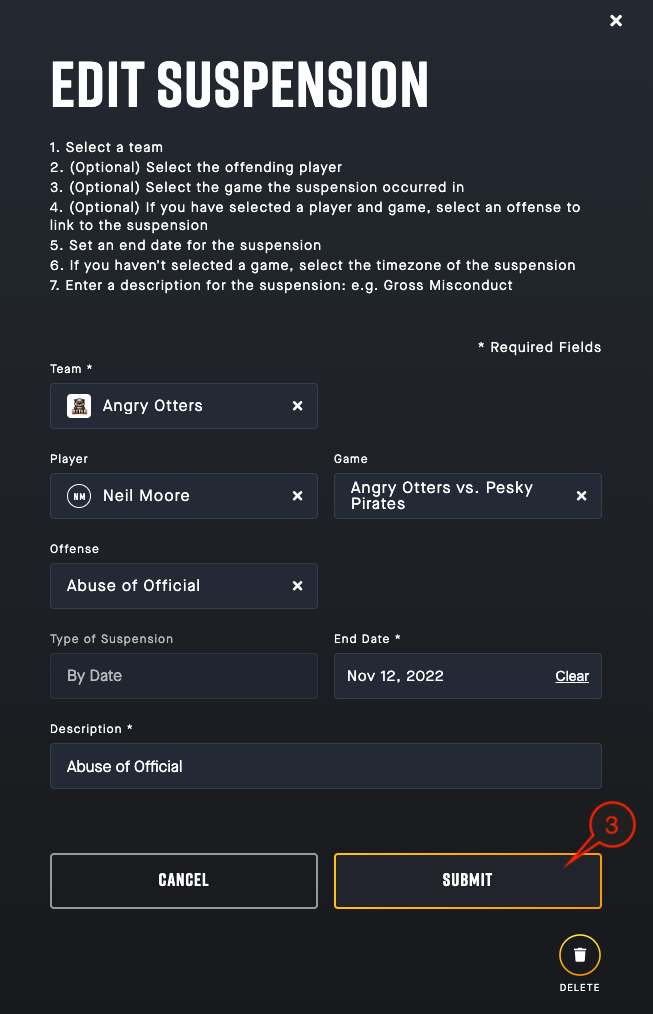
3. In the main window, click on the “**Edit**” button beside the suspension you wish to edit. This will open a side menu that will allow you to edit the suspension details.

4. To **Edit** any of the suspension details, click on the field you wish to edit and update the information.
5. Click on the "**Submit**" button when you are finished updating the information.
### How do I Delete a Suspension?
### Directions:
1. Navigate to the **Competition** page in which you want to create a new suspension.
2. In the Competition tab bar, click on the “**Suspensions**”
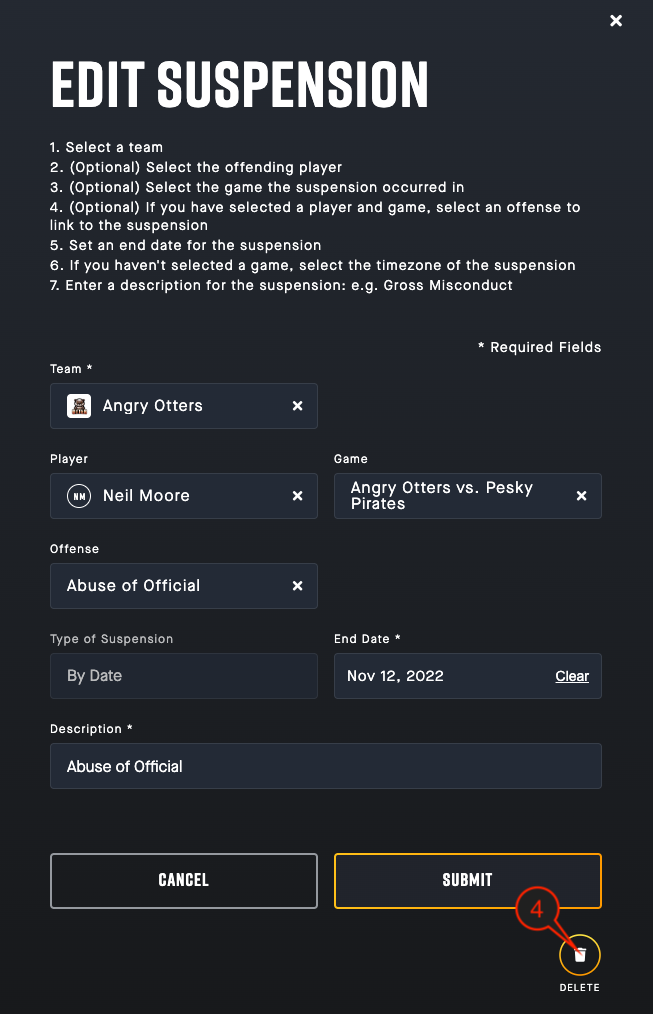
3. In the main window, click on the “**Edit**” button beside the suspension you wish to delete. This will open a side menu that will allow you to complete the process.
4. Click on the "Delete" button at the bottom of the pop-up window.
Note: This process cannot be undone once completed. To reinstate the suspension an Admin will need to create a new suspension.
- [Getting Started](https://support.sportninja.com/getting-started?hsLang=en)
- [FAQs](https://support.sportninja.com/faqs?hsLang=en)
- [Release Updates](https://support.sportninja.com/release-updates?hsLang=en)
- [Registration & Payments](https://support.sportninja.com/registration-payments?hsLang=en)
- [Support](https://support.sportninja.com/support?hsLang=en)
- [League & Competition Management](https://support.sportninja.com/league-competition-management?hsLang=en#main-content)
- [File Importing/Exporting](https://support.sportninja.com/league-competition-management?hsLang=en#file-importing-exporting)
- [Events](https://support.sportninja.com/league-competition-management?hsLang=en#events)
- [Team & Roster Management](https://support.sportninja.com/team-roster-management?hsLang=en#main-content)
- [Team and Player Management](https://support.sportninja.com/team-roster-management?hsLang=en#team-and-player-management)
- [Team Communication](https://support.sportninja.com/team-roster-management?hsLang=en#team-communication)
- [Team Officials (Mgrs, Reps, Trainers)](https://support.sportninja.com/team-roster-management?hsLang=en#team-officials-mgrs-reps-trainers)
- [Game Attendance](https://support.sportninja.com/team-roster-management?hsLang=en#game-attendance)
- [Team - Schedule](https://support.sportninja.com/team-roster-management?hsLang=en#team-schedule)
- [Scoring & Game Administration](https://support.sportninja.com/scoring-game-administration?hsLang=en#main-content)
- [Game Set up and Scoring](https://support.sportninja.com/scoring-game-administration?hsLang=en#game-set-up-and-scoring)
- [Post-game Edits](https://support.sportninja.com/scoring-game-administration?hsLang=en#post-game-edits)
- [Feed & Communications](https://support.sportninja.com/feed-communications?hsLang=en#main-content)
- [Posts and Communications](https://support.sportninja.com/feed-communications?hsLang=en#posts-and-communications)
- [Integrations](https://support.sportninja.com/integrations?hsLang=en#main-content)
- [DASH Daysmart Integration](https://support.sportninja.com/integrations?hsLang=en#dash-daysmart-integration)
- [Account & Profile Management](https://support.sportninja.com/account-profile-management?hsLang=en)
- [Security & Privacy](https://support.sportninja.com/security-privacy?hsLang=en#main-content)
- [Data Privacy Management](https://support.sportninja.com/security-privacy?hsLang=en#data-privacy-management)
- [Video Streaming & Highlights](https://support.sportninja.com/video-streaming-highlights?hsLang=en#main-content)
- [Video - Upload](https://support.sportninja.com/video-streaming-highlights?hsLang=en#video-upload)
- [Video - Streaming (Broadcasting)](https://support.sportninja.com/video-streaming-highlights?hsLang=en#video-streaming-broadcasting)
- [Platform Overview & Architecture](https://support.sportninja.com/platform-overview-architecture?hsLang=en#main-content)
- [Functionality by Platform](https://support.sportninja.com/platform-overview-architecture?hsLang=en#functionality-by-platform)
- [Platform Overview | Key Concepts](https://support.sportninja.com/platform-overview-architecture?hsLang=en#platform-overview-key-concepts)
- [Roles & Access](https://support.sportninja.com/platform-overview-architecture?hsLang=en#roles-access)
- [Supported Devices & Platforms (OS)](https://support.sportninja.com/platform-overview-architecture?hsLang=en#supported-devices-platforms-os)
- [League & Competition Management 2](https://support.sportninja.com/league-competition-management-2?hsLang=en#main-content)
- [Application Management](https://support.sportninja.com/league-competition-management-2?hsLang=en#application-management)
- [League & Competition Management 3](https://support.sportninja.com/league-competition-management-3?hsLang=en#main-content)
- [Player Administration](https://support.sportninja.com/league-competition-management-3?hsLang=en#player-administration)
- [League & Competition Management 5](https://support.sportninja.com/league-competition-management-5?hsLang=en#main-content)
- [Organization Set up](https://support.sportninja.com/league-competition-management-5?hsLang=en#organization-set-up)
- [League & Competition Management 6](https://support.sportninja.com/league-competition-management-6?hsLang=en#main-content)
- [Tournaments / Playoffs](https://support.sportninja.com/league-competition-management-6?hsLang=en#tournaments-playoffs)
- [League & Competition Management 7](https://support.sportninja.com/league-competition-management-7?hsLang=en)
- [Schedule Creation - Scheduler](https://support.sportninja.com/schedule-creation-scheduler?hsLang=en)
[.png?width=200&height=45&name=00-primary%20(10).png "00-primary (10)")](https://www.sportninja.com/)
[mailto:support@sportninja.com](mailto:support@sportninja.com)
Copyright © 2024, SportNinja