---
title: Update your subscription (credit card)
description: Update Credit Card
---
[Skip to content](https://support.sportninja.com/update-your-subscription-credit-card#main-content)
[Customer Portal (Login)](https://tickets.sportninja.com/tickets-view?hsLang=en)
[.png?width=180&height=40&name=00-primary%20(10).png)](https://support.sportninja.com/?hsLang=en)
- [Support Center - Articles](https://support.sportninja.com/)
- [Sign-out](https://tickets.sportninja.com/_hcms/mem/logout)
Open main navigation
Close main navigation
- [Support Center - Articles](https://support.sportninja.com/)
- [Sign-out](https://tickets.sportninja.com/_hcms/mem/logout)
- [Customer Portal (Login)](https://tickets.sportninja.com/tickets-view)
- [Create a new ticket](https://share.hsforms.com/1j_homW9dRNmwFUO9hkDq9wqwtlc)
[Create a new ticket](https://share.hsforms.com/1j_homW9dRNmwFUO9hkDq9wqwtlc)
How can we help?
- There are no suggestions because the search field is empty.
1. [SportNinja Support Center](https://support.sportninja.com/?hsLang=en)
2. [Account & Profile Management](https://support.sportninja.com/account-profile-management?hsLang=en)
# Update your subscription (credit card)
**Overview**: To update your credit card info on your account follow these steps.
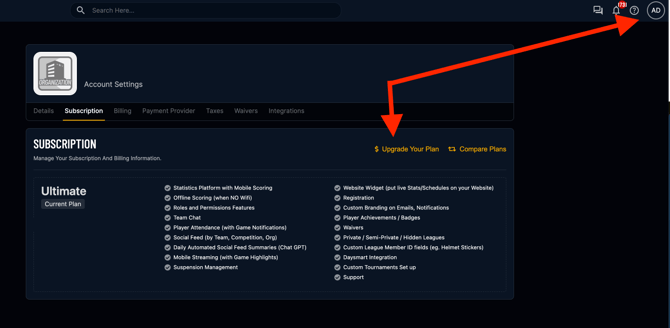
Click on your profile in the top-right corner of the web/desktop.
Then navigate to your Subscription tab.
Then to the Upgrade your Plan button.
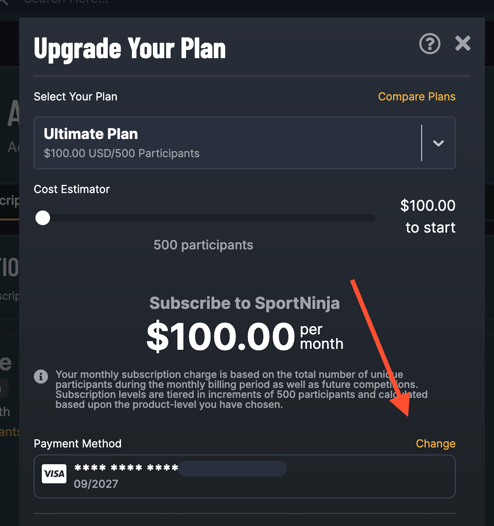
Then, hit the Change button.
- [Getting Started](https://support.sportninja.com/getting-started?hsLang=en)
- [FAQs](https://support.sportninja.com/faqs?hsLang=en)
- [Release Updates](https://support.sportninja.com/release-updates?hsLang=en)
- [Registration & Payments](https://support.sportninja.com/registration-payments?hsLang=en)
- [Support](https://support.sportninja.com/support?hsLang=en)
- [League & Competition Management](https://support.sportninja.com/league-competition-management?hsLang=en#main-content)
- [File Importing/Exporting](https://support.sportninja.com/league-competition-management?hsLang=en#file-importing-exporting)
- [Events](https://support.sportninja.com/league-competition-management?hsLang=en#events)
- [Team & Roster Management](https://support.sportninja.com/team-roster-management?hsLang=en#main-content)
- [Team and Player Management](https://support.sportninja.com/team-roster-management?hsLang=en#team-and-player-management)
- [Team Communication](https://support.sportninja.com/team-roster-management?hsLang=en#team-communication)
- [Team Officials (Mgrs, Reps, Trainers)](https://support.sportninja.com/team-roster-management?hsLang=en#team-officials-mgrs-reps-trainers)
- [Game Attendance](https://support.sportninja.com/team-roster-management?hsLang=en#game-attendance)
- [Team - Schedule](https://support.sportninja.com/team-roster-management?hsLang=en#team-schedule)
- [Scoring & Game Administration](https://support.sportninja.com/scoring-game-administration?hsLang=en#main-content)
- [Game Set up and Scoring](https://support.sportninja.com/scoring-game-administration?hsLang=en#game-set-up-and-scoring)
- [Post-game Edits](https://support.sportninja.com/scoring-game-administration?hsLang=en#post-game-edits)
- [Feed & Communications](https://support.sportninja.com/feed-communications?hsLang=en#main-content)
- [Posts and Communications](https://support.sportninja.com/feed-communications?hsLang=en#posts-and-communications)
- [Integrations](https://support.sportninja.com/integrations?hsLang=en#main-content)
- [DASH Daysmart Integration](https://support.sportninja.com/integrations?hsLang=en#dash-daysmart-integration)
- [Account & Profile Management](https://support.sportninja.com/account-profile-management?hsLang=en)
- [Security & Privacy](https://support.sportninja.com/security-privacy?hsLang=en#main-content)
- [Data Privacy Management](https://support.sportninja.com/security-privacy?hsLang=en#data-privacy-management)
- [Video Streaming & Highlights](https://support.sportninja.com/video-streaming-highlights?hsLang=en#main-content)
- [Video - Upload](https://support.sportninja.com/video-streaming-highlights?hsLang=en#video-upload)
- [Video - Streaming (Broadcasting)](https://support.sportninja.com/video-streaming-highlights?hsLang=en#video-streaming-broadcasting)
- [Platform Overview & Architecture](https://support.sportninja.com/platform-overview-architecture?hsLang=en#main-content)
- [Functionality by Platform](https://support.sportninja.com/platform-overview-architecture?hsLang=en#functionality-by-platform)
- [Platform Overview | Key Concepts](https://support.sportninja.com/platform-overview-architecture?hsLang=en#platform-overview-key-concepts)
- [Roles & Access](https://support.sportninja.com/platform-overview-architecture?hsLang=en#roles-access)
- [Supported Devices & Platforms (OS)](https://support.sportninja.com/platform-overview-architecture?hsLang=en#supported-devices-platforms-os)
- [League & Competition Management 2](https://support.sportninja.com/league-competition-management-2?hsLang=en#main-content)
- [Application Management](https://support.sportninja.com/league-competition-management-2?hsLang=en#application-management)
- [League & Competition Management 3](https://support.sportninja.com/league-competition-management-3?hsLang=en#main-content)
- [Player Administration](https://support.sportninja.com/league-competition-management-3?hsLang=en#player-administration)
- [League & Competition Management 5](https://support.sportninja.com/league-competition-management-5?hsLang=en#main-content)
- [Organization Set up](https://support.sportninja.com/league-competition-management-5?hsLang=en#organization-set-up)
- [League & Competition Management 6](https://support.sportninja.com/league-competition-management-6?hsLang=en#main-content)
- [Tournaments / Playoffs](https://support.sportninja.com/league-competition-management-6?hsLang=en#tournaments-playoffs)
- [League & Competition Management 7](https://support.sportninja.com/league-competition-management-7?hsLang=en)
- [Schedule Creation - Scheduler](https://support.sportninja.com/schedule-creation-scheduler?hsLang=en)
[.png?width=200&height=45&name=00-primary%20(10).png "00-primary (10)")](https://www.sportninja.com/)
[mailto:support@sportninja.com](mailto:support@sportninja.com)
Copyright © 2024, SportNinja